
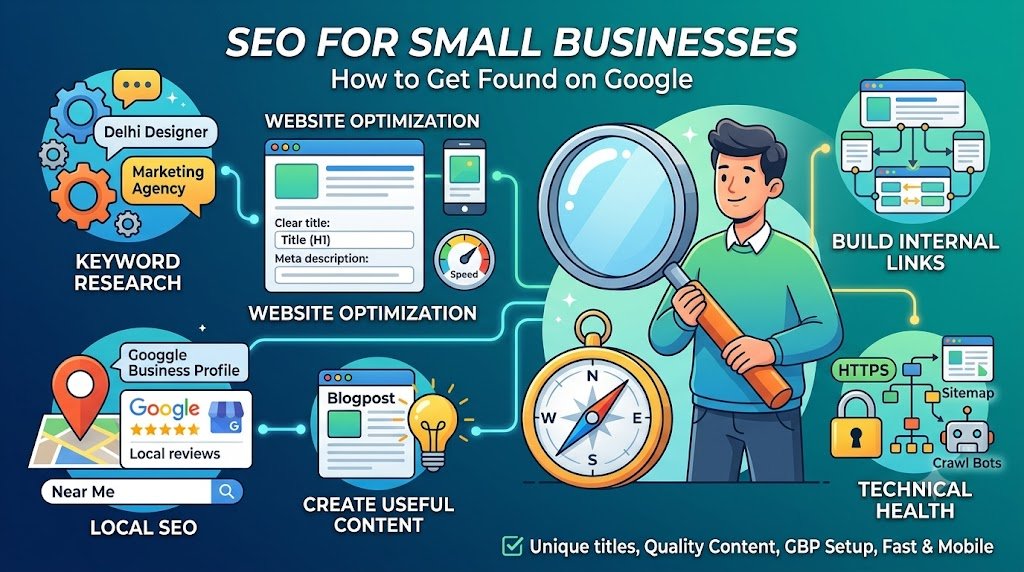
SEO for Small Businesses: How to Get Found on Google
Imagine someone searches:
“digital marketing agency near me”
or
“website designer in Delhi”
or
“best footwear shop in Janakpuri.”
If your business is relevant but difficult to find online, you’re potentially missing opportunities.
This is why SEO for small businesses matters.
What Is SEO?
Search Engine Optimization is the process of improving a website so search engines can better discover, understand and present its content to relevant users.
Google describes SEO as improving your site to help search engines understand your content and help users find your site.
Why Should Small Businesses Invest in SEO?
SEO can help businesses work toward:
- Greater organic visibility
- Relevant website traffic
- Local discovery
- Brand awareness
- Long-term content visibility
However, SEO is not an instant traffic switch.
Results depend on factors including competition, website quality, content, authority, technical health and search demand.
1. Start With Keyword Research
Keyword research identifies what people search for.
For example:
Informational
“What is SEO?”
Commercial
“best SEO agency Delhi”
Transactional
“hire SEO agency Delhi”
Local
“SEO agency near me”
The goal isn’t to insert keywords everywhere.
Instead, understand the search intent behind them.
2. Optimize Your Website Pages
Important elements include:
- Page title
- Main heading
- Subheadings
- URL
- Content
- Internal links
- Images
- Meta description
Google recommends clear, descriptive titles and relevant links between pages.
3. Create Useful Content
Create content that answers real customer questions.
For example, a digital marketing agency could publish:
- How much does SEO cost?
- How does local SEO work?
- SEO vs Google Ads
- How to improve website visibility
- How to create an Instagram strategy
- How to choose a digital marketing agency
4. Focus on Local SEO
If you serve a specific location, local SEO becomes particularly relevant.
Optimize your:
- Google Business Profile
- Business information
- Website location pages
- Local content
- Customer reviews
- Local citations
Make sure your business information is accurate and consistent.
5. Build Internal Links
Suppose your blog discusses SEO.
You could link to:
SEO Services
Then from your SEO page, link to:
Content Marketing
and:
Website Design & Development
Google notes that links help users and search engines discover other relevant pages.
6. Make Your Website Technically Healthy
Pay attention to:
- Mobile usability
- Page speed
- Crawlability
- Indexing
- Broken links
- HTTPS
- Sitemap
- Redirects
- Duplicate content
7. Create Content for People First
Don’t write an article simply because a keyword has search volume.
Ask:
“Would my target customer genuinely find this useful?”
Google specifically recommends people-first content and warns against creating large amounts of content primarily for search-engine traffic.
SEO Checklist for Small Businesses
Website
☐ Mobile-friendly
☐ Clear navigation
☐ HTTPS
☐ Fast enough for users
☐ Search-friendly structure
On-Page SEO
☐ Unique titles
☐ Useful headings
☐ Relevant keywords
☐ Internal links
☐ Helpful content
Local SEO
☐ Google Business Profile
☐ Accurate business information
☐ Reviews
☐ Local content
Content
☐ Customer questions
☐ Informational blogs
☐ Commercial content
☐ Service pages
☐ Updated information
Conclusion
SEO isn’t about trying to trick Google into ranking your website.
It’s about making your website useful, understandable, accessible and relevant to the people searching for what you offer.
At Alfluencia, our SEO services combine:
Keyword Research + On-Page SEO + Technical SEO + Local SEO + Content Strategy